보안을 강화하고 사용자 경험을 개선하기 위해 F5 NGINX Plus(R29+)는 이제 SAML(Security Assertion Markup Language)을 지원합니다. 웹 애플리케이션에 SSO(Single Sign-On)를 제공하는 검증된 프로토콜인 SAML을 사용하면 ID 공급자(IdP)가 리소스에 액세스하려는 사용자를 인증한 후 해당 정보를 서비스 공급자(SP)에 전달하여 권한을 부여할 수 있습니다.
이 블로그 게시물에서는 SAML을 기본적으로 지원하지 않는 웹 애플리케이션을 사용하여 NGINX를 Microsoft Entra ID(이전 명칭: Azure Active Directory(Azure AD))와 통합하는 방법을 단계별로 설명합니다. 또한 애플리케이션에 SSO를 구현하고 Microsoft Entra ID 에코시스템과 통합하는 방법도 다룹니다. 이 튜토리얼을 따라 하면 NGINX가 SAML 어설션에서 클레임(UPN, 이름, 성, 그룹 멤버십 포함)을 추출한 후 HTTP 헤더를 통해 애플리케이션에 전달하는 방법도 배울 수 있습니다.
이 튜토리얼은 다음 세 단계로 구성됩니다:
- Microsoft Entra ID를 IdP로 구성
- SAML 설정 및 NGINX Plus를 역방향 프록시로 구성
- 구성 테스트
이 튜토리얼을 완료하려면 다음이 필요합니다:
- 30일 무료 평가판으로 이용할 수 있는 NGINX Plus (R29+)
- 무료 또는 엔터프라이즈 Microsoft Entra ID 계정
- NGINX Plus 서버에 설치된 유효한 SSL/TLS 인증서(이 튜토리얼에서는
dev.sports.com.crt and dev.sports.com.key사용) - SAML 어설션을 검증하려면 IdP에서 공개 인증서
demonginx.cer를 다운로드하면 됩니다.
참고: 이 튜토리얼은 키-값 저장소가 NGINX Plus에서만 제공되므로 NGINX Open Source 배포에는 적용되지 않습니다.
NGINX Plus를 SAML 서비스 공급자로 사용
이 구성에서 NGINX Plus는 SAML SP 역할을 하며, 사용자 에이전트를 통해 NGINX Plus와 간접적으로 통신하는 SAML IdP를 사용하는 SSO 구현에 참여할 수 있습니다.
아래 다이어그램은 SP에서 시작되고 요청 및 응답에 POST 바인딩을 사용하는 SSO 프로세스 흐름을 보여 줍니다. 이 통신 채널은 직접 연결되지 않으며 사용자 에이전트를 통해 관리된다는 점을 다시 한번 유의해야 합니다.
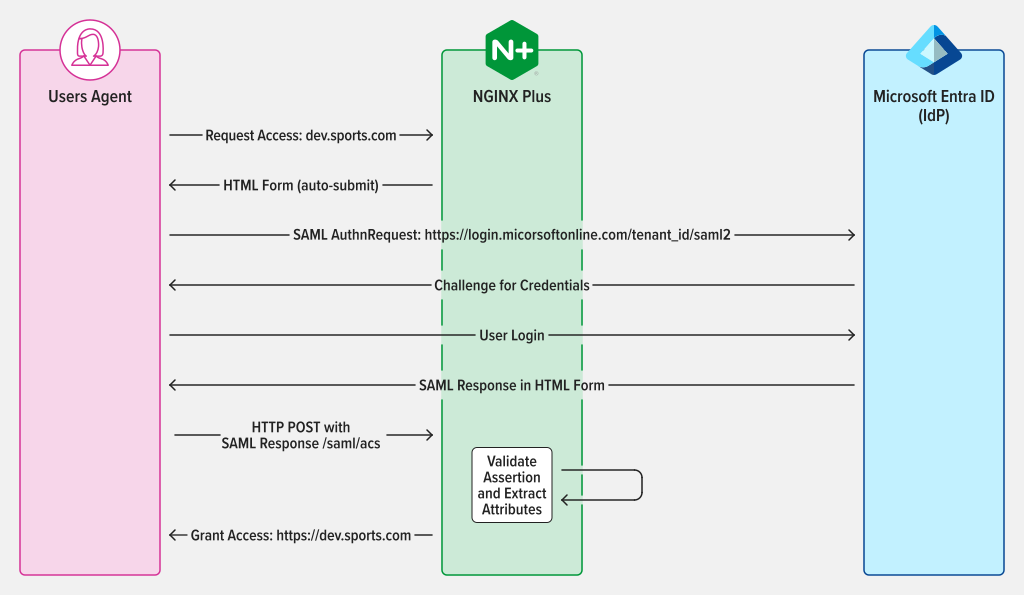
그림 1: AuthnRequest 및 Response에 POST 바인딩을 사용하는 SAML SP 시작 SSO
1단계: Microsoft Entra ID를 ID 공급자로 구성
Microsoft Entra ID 관리 포털에 액세스하려면 로그인한 후 왼쪽 패널로 이동하세요. Microsoft Entra ID를 선택한 다음 SSO 구성이 필요한 디렉터리의 이름을 클릭하세요. 디렉터리를 선택한 후 엔터프라이즈 애플리케이션을 선택하세요.
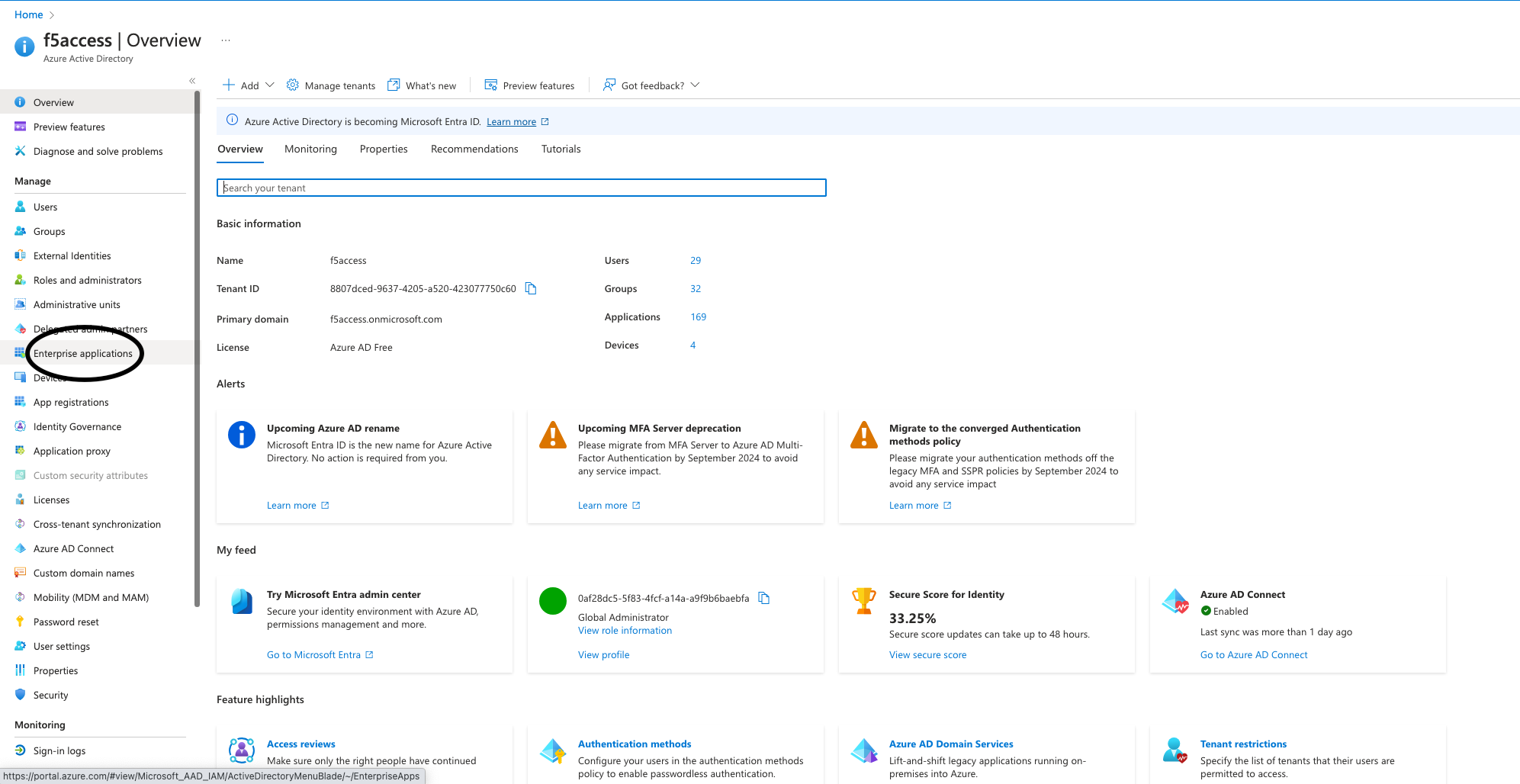
그림 2: 관리 포털에서 엔터프라이즈 애플리케이션 선택
애플리케이션을 만들려면 포털 상단의 새 애플리케이션 버튼을 클릭합니다. 이 예에서는 demonginx라는 애플리케이션을 만들었습니다.
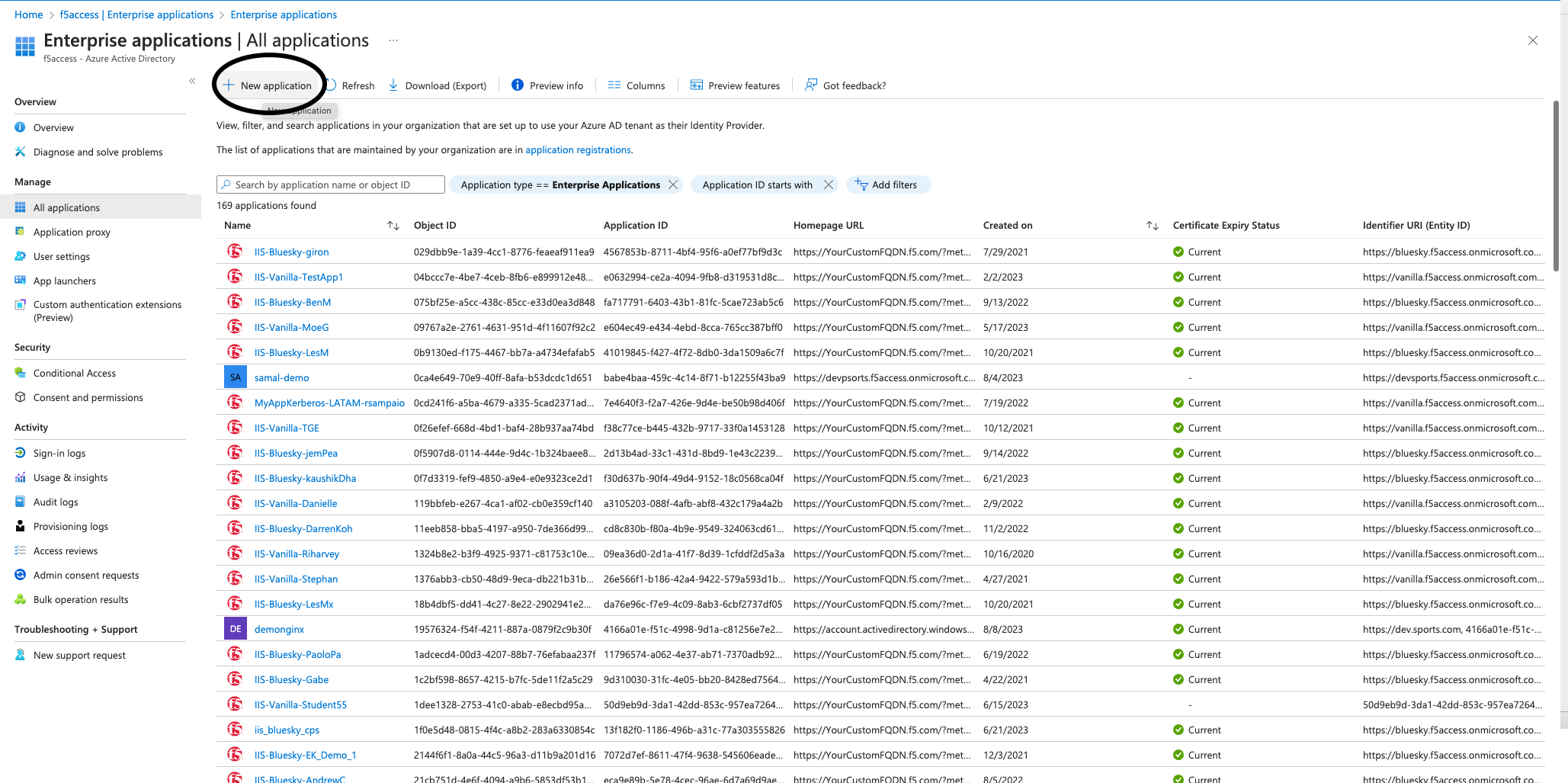
그림 3: Microsoft Entra ID에서 새 애플리케이션 만들기
새로 만든 애플리케이션의 개요 페이지로 리디렉션되면 왼쪽 메뉴에서 시작하기로 이동한 후 관리 아래의 Single Sign-On을 클릭합니다. 그런 다음 SAML을 Single Sign-On 방식으로 선택합니다.
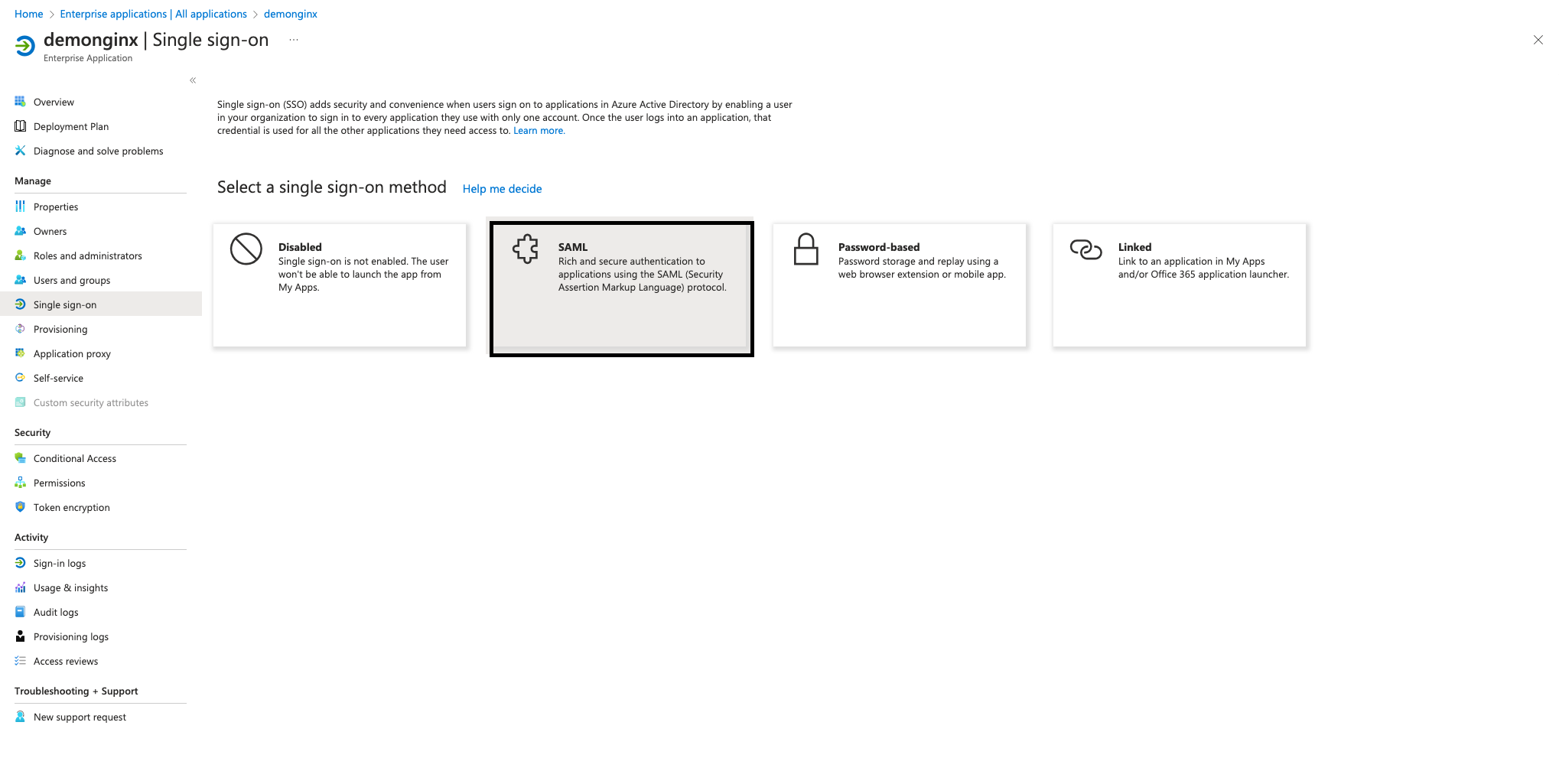
그림 4: SSO 섹션에서 SAML 구성 시작
엔터프라이즈 애플리케이션에서 SSO를 설정하려면 Microsoft Entra ID에 NGINX Plus를 SP로 등록해야 합니다. 이렇게 하려면 그림 5와 같이 편집 옆에 있는 연필 아이콘을 클릭합니다. 기본 SAML 구성, as seen Figure 5.
다음 값을 추가한 후 저장을 클릭합니다:
- 식별자(엔터티 ID) – https://dev.sports.com
- 회신 URL(Assertion Consumer Service URL) – https://dev.sports.com/saml/acs
- 로그인 URL: https://dev.sports.com
- 로그아웃 URL(선택 사항): https://dev.sports.com/saml/sls
검증 인증서 사용은 선택 사항입니다. 이 설정을 활성화할 때는 NGINX에서 두 가지 구성 옵션을 설정해야 합니다:
- 공개 키로 서명을 검증하려면
$saml_sp_sign_authn을 true로 설정해야 합니다. 그러면 SP가 IdP로 전송되는 AuthnRequest에 서명합니다. - 이 서명에 사용할 개인 키의 경로를 지정하려면
$saml_sp_signing_key를 구성하세요. 서명 검증을 위해 해당 공개 키 인증서를 Microsoft Entra ID에 업로드해야 합니다.
참고: 이 데모에서는 특성과 클레임이 수정되었으며 새로운 SAML 특성이 추가되었습니다. 이러한 SAML 특성은 IdP에서 전송됩니다. NGINX 구성이 이러한 특성을 올바르게 수신하고 처리하도록 설정되어 있는지 확인하세요. 관련 설정은 NGINX GitHub 리포지토리에서 확인하고 조정할 수 있습니다.
Microsoft Entra ID에서 IdP 인증서(원시)를 다운로드하여 NGINX Plus 인스턴스에 저장합니다.
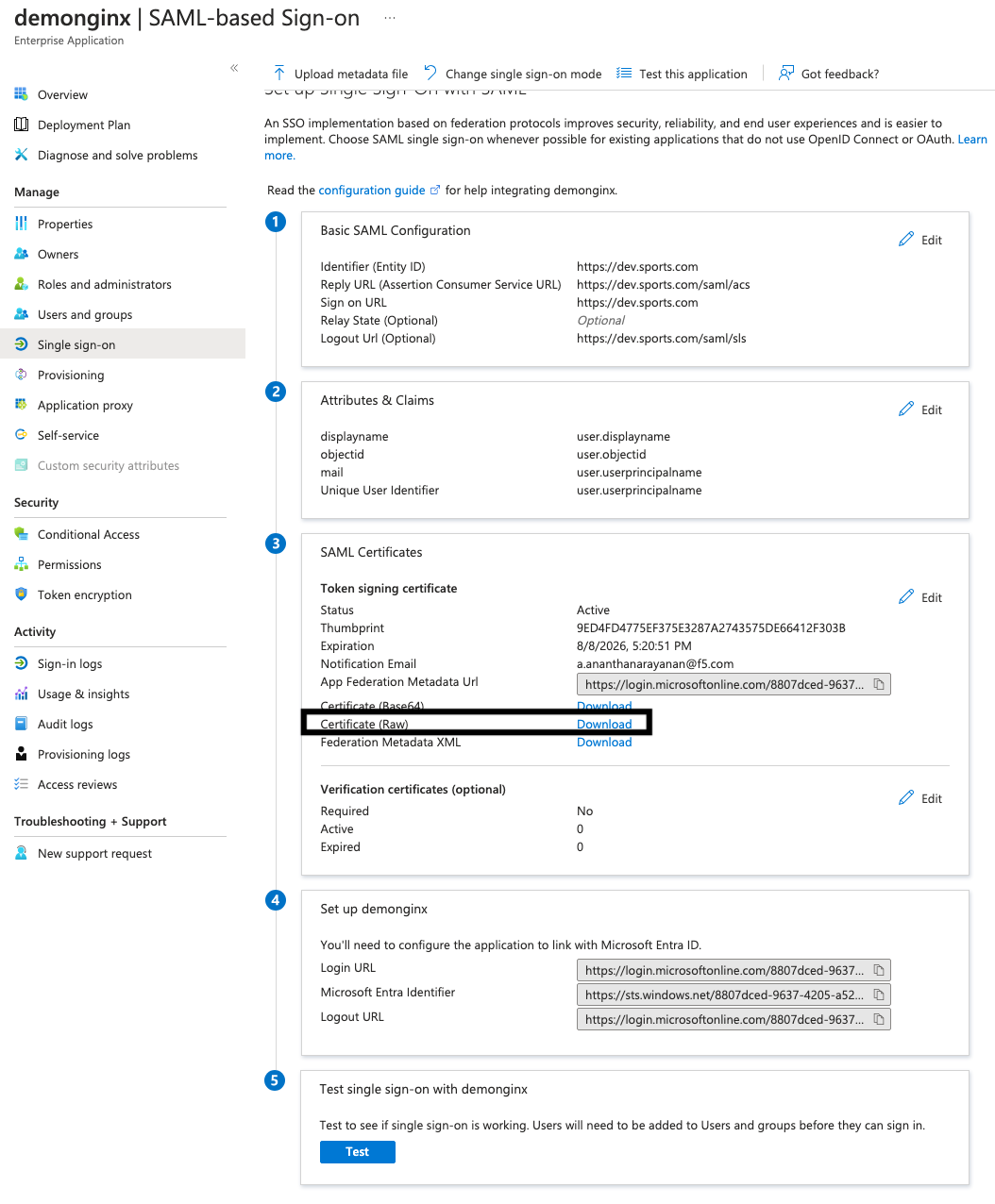
그림 5: Microsoft Entra ID에서 IdP 인증서(원시) 다운로드
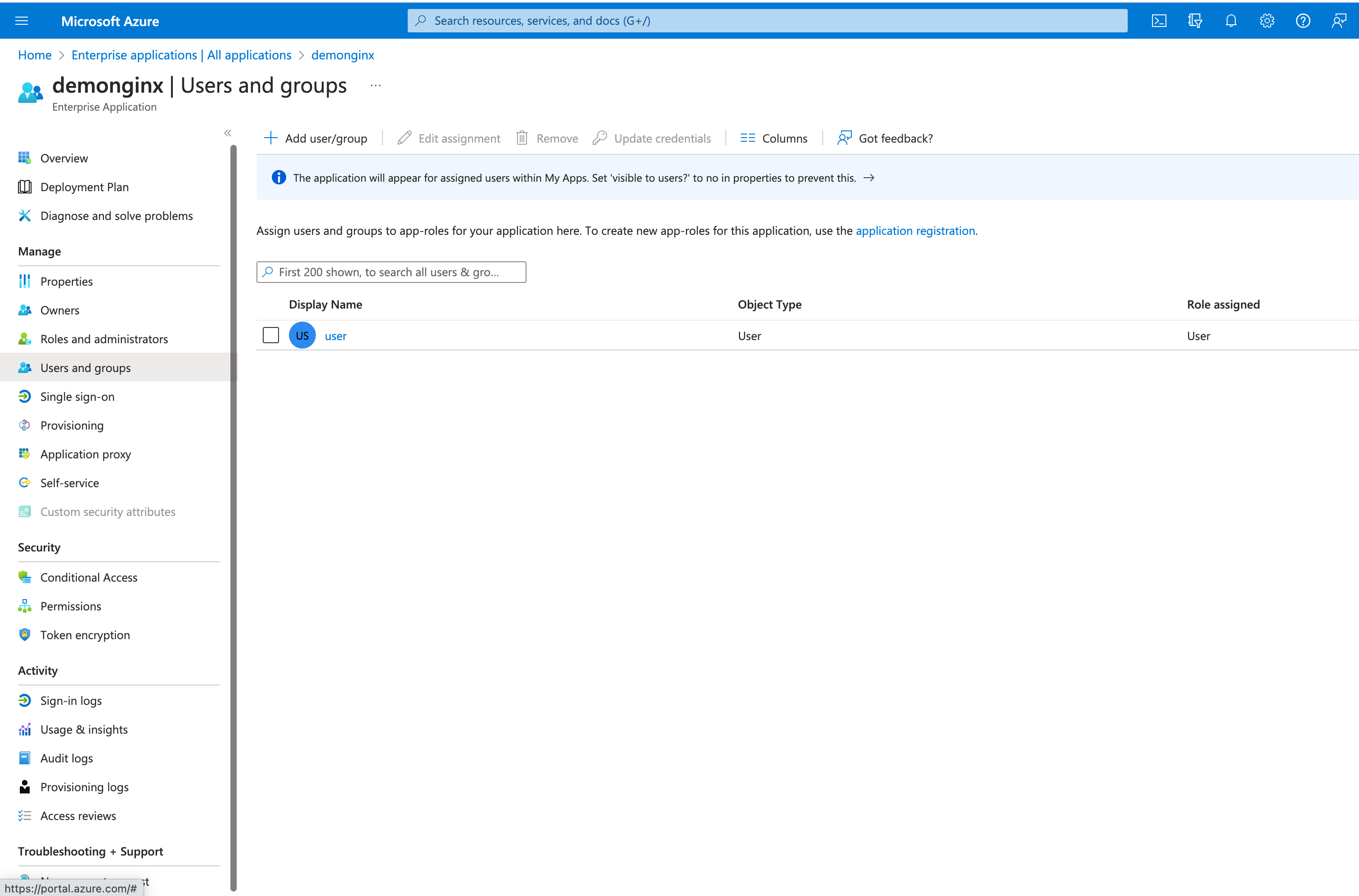
그림 6: 새 사용자 또는 그룹 추가
Microsoft Entra ID에서 사용자와 그룹을 추가하거나 할당하여 SSO가 활성화된 회사 애플리케이션에 대한 액세스 권한을 부여할 수 있습니다.
왼쪽 메뉴에서 사용자 및 그룹을 클릭한 다음, 상단의 사용자/그룹 추가 버튼을 클릭합니다.
2단계: SAML 설정 구성 및 NGINX Plus를 리버스 프록시로 구성
NGINX Plus SP에서 파일을 구성하기 전에 필요한 인증서가 준비되어 있는지 확인하세요:
- TLS 세션 종료를 위한 인증서(
dev.sports.com.crt and dev.sports.com.key) - IdP 서명 검증을 위해 Microsoft Entra ID에서 다운로드한 인증서 (
demonginx.cer)
참고: 인증서는 SPKI 형식이어야 합니다.
이 단계를 시작하려면 서명 검증에 사용할 IdP 인증서를 Microsoft Entra ID에서 다운로드합니다. 그런 다음 PEM 형식을 DER 형식으로 변환합니다:
openssl x509 -in demonginx.cer -outform DER -out demonginx.der
SAML SP 어설션을 검증하려는 경우에는 TLS 종료에 사용되는 키와 다른 공개 키/개인 키를 사용하는 것이 좋습니다.
공개 키 인증서를 SPKI 형식으로 추출합니다:
openssl x509 -inform DER -in demonginx.der -pubkey -noout > demonginx.spki
frontend.conf 파일을 편집하여 다음 항목을 업데이트합니다:
ssl_certificate– TLS 인증서 경로를 포함하도록 업데이트합니다.ssl_certificate_key– TLS 개인 키 경로를 포함하도록 업데이트합니다.
프로덕션 배포에서는 비즈니스 요구 사항에 따라 서로 다른 백엔드 대상을 사용할 수 있습니다. 이 예시에서 백엔드는 사용자 지정 응답을 제공합니다:
“애플리케이션 페이지에 오신 것을 환영합니다n 내 개체 ID는 $http_objectidn 내 이메일은 $http_mailn입니다”;
Microsoft Entra ID에서 사용자의 mail 및 objectid에 대한 새 클레임을 추가하여 특성과 클레임을 수정했습니다. 이러한 업데이트를 통해 애플리케이션에서 사용자에게 더욱 개인화되고 맞춤화된 응답을 제공하여 사용자 경험을 개선할 수 있습니다.
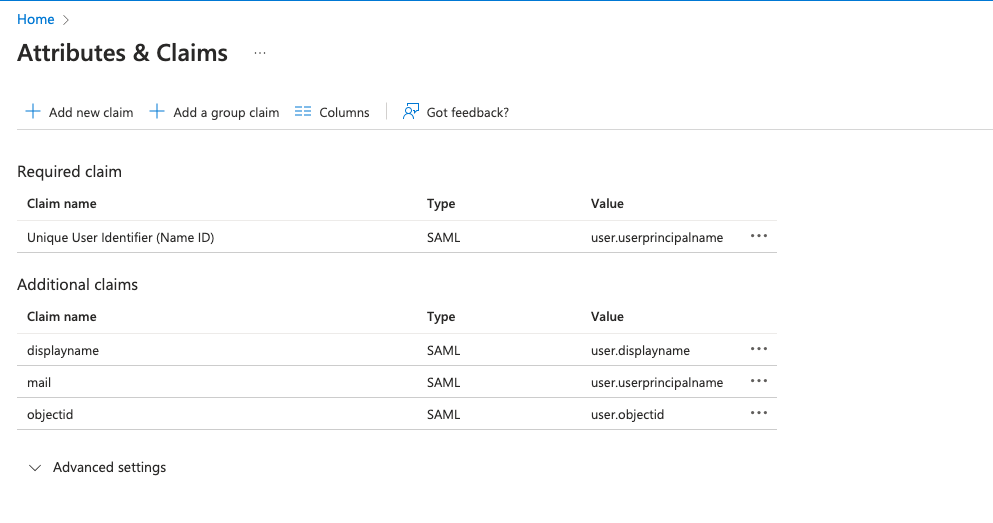
그림 7: Microsoft Entra ID에서 수정된 특성 및 클레임
다음 단계는 백엔드 애플리케이션으로 트래픽을 프록시하도록 NGINX를 구성하는 것입니다. 이 데모에서 백엔드 SAML 애플리케이션은 https://dev.sports.com에서 공개적으로 액세스할 수 있습니다.
Edit your frontend.conf 파일을 편집합니다:
# This is file frontend.conf
# This is the backend application we are protecting with SAML SSO
upstream my_backend {
    zone my_backend 64k;
    server dev.sports.com;
}

# Custom log format to include the 'NameID' subject in the REMOTE_USER field
log_format saml_sso '$remote_addr - $saml_name_id [$time_local] "$request" "$host" '
                    '$status $body_bytes_sent "$http_referer" '
                    '"$http_user_agent" "$http_x_forwarded_for"';

# The frontend server - reverse proxy with SAML SSO authentication
#
server {
    # Functional locations implementing SAML SSO support
    include conf.d/saml_sp.server_conf;


    # Reduce severity level as required
    error_log /var/log/nginx/error.log debug;
    listen 443 ssl;
    ssl_certificate     /home/ubuntu/dev.sports.com.crt;
    ssl_certificate_key  /home/ubuntu/dev.sports.com.key;
    ssl_session_cache shared:SSL:5m;


    location / {
        # When a user is not authenticated (i.e., the "saml_access_granted."
        # variable is not set to "1"), an HTTP 401 Unauthorized error is
        # returned, which is handled by the @do_samlsp_flow named location.
        error_page 401 = @do_samlsp_flow;

        if ($saml_access_granted != "1") {
            return 401;
        }

        # Successfully authenticated users are proxied to the backend,
        # with the NameID attribute passed as an HTTP header
        proxy_set_header mail $saml_attrib_mail;  # Microsoft Entra ID's user.mail
        proxy_set_header objectid $saml_attrib_objectid; # Microsoft Entra ID's objectid
        access_log /var/log/nginx/access.log saml_sso;
        proxy_pass http://my_backend;
        proxy_set_header Host dev.sports.com;
        return 200 "Welcome to Application pagen My objectid is $http_objectidn My email is $http_mailn";
        default_type text/plain;

   }
}
# vim: syntax=nginx
특성 saml_attrib_mail 및 saml_attrib_ objectid가 NGINX 구성에 반영되도록 하려면 saml_sp_configuration.conf의 키-값 저장소 부분을 다음과 같이 업데이트합니다:
keyval_zone    zone=saml_attrib_mail:1M                state=/var/lib/nginx/state/saml_attrib_email.json   timeout=1h;
keyval   $cookie_auth_token $saml_attrib_mail    zone=saml_attrib_mail;

 keyval_zone zone=saml_attrib_objectid:1M            state=/var/lib/nginx/state/saml_attrib_objectid.json   timeout=1h;
keyval   $cookie_auth_token $saml_attrib_objectid   zone=saml_attrib_objectid;
다음으로 SAML SSO 구성 파일을 설정합니다. 이 파일에는 SP 및 IdP의 주요 구성이 포함되어 있습니다. 특정 SP 및 IdP 설정에 맞게 사용자 지정하려면 파일에 포함된 여러 map{} 블록을 조정해야 합니다.
다음 표에서는 saml_sp_configuration.conf의 변수에 대해 설명합니다:
| 변수 | 설명 |
|---|---|
saml_sp_entity_id | 사용자가 애플리케이션에 액세스할 때 사용하는 URL입니다. |
saml_sp_acs_url | 서비스 공급자가 SAML 응답을 수신 및 처리하고, 사용자의 ID를 추출한 다음, 제공된 정보를 기반으로 요청된 리소스에 대한 액세스를 허용하거나 거부하는 데 사용하는 URL입니다. |
saml_sp_sign_authn | SP에서 IdP로 보내는 SAML 요청에 서명할지 여부를 지정합니다. 서명에는 SP 서명 키가 사용되며, 서명을 확인하려면 연결된 인증서를 IdP에 업로드해야 합니다. |
saml_sp_signing_key | SP에서 IdP로 보내는 SAML 요청에 서명하는 데 사용되는 서명 키입니다. 서명을 확인할 수 있도록 연결된 인증서를 IdP에 업로드해야 합니다. |
saml_idp_entity_id | IdP를 정의하는 데 사용되는 ID입니다. |
saml_idp_sso_url | 인증 요청을 시작하기 위해 SP가 SAML 어설션 요청을 보내는 IdP 엔드포인트입니다. |
saml_idp_verification_certificate | IdP에서 수신한 서명된 SAML 어설션을 확인하는 데 사용되는 인증서입니다. 이 인증서는 IdP에서 제공하며 SPKI 형식이어야 합니다. |
saml_sp_slo_url | IdP가 로그아웃 프로세스를 시작할 때 SAML LogoutRequest를 보내거나 로그아웃을 확인할 때 LogoutResponse를 보내는 SP 엔드포인트입니다. |
saml_sp_sign_slo | 로그아웃 SAML에 SP가 서명할지 여부를 지정합니다. |
saml_idp_slo_url | SP가 로그아웃 프로세스를 시작할 때 LogoutRequest를 보내거나 로그아웃을 확인할 때 LogoutResponse를 보내는 IdP 엔드포인트입니다. |
saml_sp_want_signed_slo | SAML SP가 IdP에서 보내는 SAML 로그아웃 응답 또는 요청에 서명할 것을 요구하는지 여부를 지정합니다. |
아래 코드는 이 사용 사례에 맞게 수정된 값만 보여 줍니다. 파일 위치: saml_sp_configuration.conf.
참고: 구성 파일의 나머지 부분(예: 키-값 저장소)이 파일에 그대로 포함되어 있는지 확인하세요. 또한 배포 환경에 맞게 saml_sp_configuration.conf 파일의 변수를 적절히 조정하세요.
 # SAML SSO configuration

map $host $saml_sp_entity_id {
    # Unique identifier that identifies the SP to the IdP.
    # Must be URL or URN.
    default "https://dev.sports.com";
}

map $host $saml_sp_acs_url {
    # The ACS URL, an endpoint on the SP where the IdP
    # will redirect to with its authentication response.
    # Must match the ACS location defined in the "saml_sp.serer_conf" file.
    default "https://dev.sports.com/saml/acs";
}

map $host $saml_sp_request_binding {
    # Refers to the method by which an authentication request is sent from
    # the SP to an IdP during the Single Sign-On (SSO) process.
    # Only HTTP-POST or HTTP-Redirect methods are allowed.
    default 'HTTP-POST';
}

map $host $saml_sp_sign_authn {
    # Whether the SP should sign the AuthnRequest sent to the IdP.
    default "false";
}

map $host $saml_sp_decryption_key {
    # Specifies the private key that the SP uses to decrypt encrypted assertion
    # or NameID from the IdP.
    default "";
}

map $host $saml_sp_force_authn {
    # Whether the SP should force re-authentication of the user by the IdP.
    default "false";
}

map $host $saml_sp_nameid_format {
    # Indicates the desired format of the name identifier in the SAML assertion
    # generated by the IdP. Check section 8.3 of the SAML 2.0 Core specification
    # (http://docs.oasis-open.org/security/saml/v2.0/saml-core-2.0-os.pdf)
    # for the list of allowed NameID Formats.
    default "urn:oasis:names:tc:SAML:1.1:nameid-format:unspecified";
}

map $host $saml_sp_relay_state {
    # Relative or absolute URL the SP should redirect to
    # after successful sign on.
    default "";
}

map $host $saml_sp_want_signed_response {
    # Whether the SP wants the SAML Response from the IdP
    # to be digitally signed.
    default "false";
}

map $host $saml_sp_want_signed_assertion {
    # Whether the SP wants the SAML Assertion from the IdP
    # to be digitally signed.
    default "true";
}

map $host $saml_sp_want_encrypted_assertion {
    # Whether the SP wants the SAML Assertion from the IdP
    # to be encrypted.
    default "false";
}

map $host $saml_idp_entity_id {
    # Unique identifier that identifies the IdP to the SP.
    # Must be URL or URN.
    default "https://sts.windows.net/8807dced-9637-4205-a520-423077750c60/";
}

map $host $saml_idp_sso_url {
    # IdP endpoint that the SP will send the SAML AuthnRequest to initiate
    # an authentication process.
    default "https://login.microsoftonline.com/8807dced-9637-4205-a520-423077750c60/saml2";
}

map $host $saml_idp_verification_certificate {
    # Certificate file that will be used to verify the digital signature
    # on the SAML Response, LogoutRequest or LogoutResponse received from IdP.
    # Must be public key in PKCS#1 format. See documentation on how to convert
    # X.509 PEM to DER format.
    default "/etc/nginx/conf.d/demonginx.spki";
}

######### Single Logout (SLO) #########

map $host $saml_sp_slo_url {
    # SP endpoint that the IdP will send the SAML LogoutRequest to initiate
    # a logout process or LogoutResponse to confirm the logout.
    default "https://dev.sports.com/saml/sls";
}

map $host $saml_sp_slo_binding {
    # Refers to the method by which a LogoutRequest or LogoutResponse
    # is sent from the SP to an IdP during the Single Logout (SLO) process.
    # Only HTTP-POST or HTTP-Redirect methods are allowed.
    default 'HTTP-POST';
}

map $host $saml_sp_sign_slo {
    # Whether the SP must sign the LogoutRequest or LogoutResponse
    # sent to the IdP.
    default "false";
}

map $host $saml_idp_slo_url {
    # IdP endpoint that the SP will send the LogoutRequest to initiate
    # a logout process or LogoutResponse to confirm the logout.
    # If not set, the SAML Single Logout (SLO) feature is DISABLED and
    # requests to the 'logout' location will result in the termination
    # of the user session and a redirect to the logout landing page.
    default "https://login.microsoftonline.com/8807dced-9637-4205-a520-423077750c60/saml2";
}

map $host $saml_sp_want_signed_slo {
    # Whether the SP wants the SAML LogoutRequest or LogoutResponse from the IdP
    # to be digitally signed.
    default "true";
}

map $host $saml_logout_landing_page {
    # Where to redirect user after requesting /logout location. This can be
    # replaced with a custom logout page, or complete URL.
    default "/_logout"; # Built-in, simple logout page
}

map $proto $saml_cookie_flags {
    http  "Path=/; SameSite=lax;"; # For HTTP/plaintext testing
    https "Path=/; SameSite=lax; HttpOnly; Secure;"; # Production recommendation
}

map $http_x_forwarded_port $redirect_base {
    ""      $proto://$host:$server_port;
    default $proto://$host:$http_x_forwarded_port;
}

map $http_x_forwarded_proto $proto {
    ""      $scheme;
    default $http_x_forwarded_proto;
}
# ADVANCED CONFIGURATION BELOW THIS LINE
# Additional advanced configuration (server context) in saml_sp.server_conf

######### Shared memory zones that keep the SAML-related key-value databases

# Zone for storing AuthnRequest and LogoutRequest message identifiers (ID)
# to prevent replay attacks. (REQUIRED)
# Timeout determines how long the SP waits for a response from the IDP,
# i.e. how long the user authentication process can take.
keyval_zone zone=saml_request_id:1M                 state=/var/lib/nginx/state/saml_request_id.json                  timeout=5m;

# Zone for storing SAML Response message identifiers (ID) to prevent replay attacks. (REQUIRED)
# Timeout determines how long the SP keeps IDs to prevent reuse.
keyval_zone zone=saml_response_id:1M                state=/var/lib/nginx/state/saml_response_id.json                 timeout=1h;

# Zone for storing SAML session access information. (REQUIRED)
# Timeout determines how long the SP keeps session access decision (the session lifetime).
keyval_zone zone=saml_session_access:1M             state=/var/lib/nginx/state/saml_session_access.json              timeout=1h;

# Zone for storing SAML NameID values. (REQUIRED)
# Timeout determines how long the SP keeps NameID values. Must be equal to session lifetime.
keyval_zone zone=saml_name_id:1M                    state=/var/lib/nginx/state/saml_name_id.json                     timeout=1h;

# Zone for storing SAML NameID format values. (REQUIRED)
# Timeout determines how long the SP keeps NameID format values. Must be equal to session lifetime.
keyval_zone zone=saml_name_id_format:1M             state=/var/lib/nginx/state/saml_name_id_format.json              timeout=1h;

# Zone for storing SAML SessionIndex values. (REQUIRED)
# Timeout determines how long the SP keeps SessionIndex values. Must be equal to session lifetime.
keyval_zone zone=saml_session_index:1M              state=/var/lib/nginx/state/saml_session_index.json               timeout=1h;

# Zone for storing SAML AuthnContextClassRef values. (REQUIRED)
# Timeout determines how long the SP keeps AuthnContextClassRef values. Must be equal to session lifetime.
keyval_zone zone=saml_authn_context_class_ref:1M    state=/var/lib/nginx/state/saml_authn_context_class_ref.json     timeout=1h;

# Zones for storing SAML attributes values. (OPTIONAL)
# Timeout determines how long the SP keeps attributes values. Must be equal to session lifetime.
keyval_zone zone=saml_attrib_uid:1M                 state=/var/lib/nginx/state/saml_attrib_uid.json                  timeout=1h;
keyval_zone zone=saml_attrib_name:1M                state=/var/lib/nginx/state/saml_attrib_name.json                 timeout=1h;
keyval_zone zone=saml_attrib_memberOf:1M            state=/var/lib/nginx/state/saml_attrib_memberOf.json             timeout=1h;

######### SAML-related variables whose value is looked up by the key (session cookie) in the key-value database.

# Required:
keyval $saml_request_id     $saml_request_redeemed          zone=saml_request_id;               # SAML Request ID
keyval $saml_response_id    $saml_response_redeemed         zone=saml_response_id;              # SAML Response ID
keyval $cookie_auth_token   $saml_access_granted            zone=saml_session_access;           # SAML Access decision
keyval $cookie_auth_token   $saml_name_id                   zone=saml_name_id;                  # SAML NameID
keyval $cookie_auth_token   $saml_name_id_format            zone=saml_name_id_format;           # SAML NameIDFormat
keyval $cookie_auth_token   $saml_session_index             zone=saml_session_index;            # SAML SessionIndex
keyval $cookie_auth_token   $saml_authn_context_class_ref   zone=saml_authn_context_class_ref;  # SAML AuthnContextClassRef

# Optional:
keyval $cookie_auth_token   $saml_attrib_uid                zone=saml_attrib_uid;
keyval $cookie_auth_token   $saml_attrib_name               zone=saml_attrib_name;
keyval $cookie_auth_token   $saml_attrib_memberOf           zone=saml_attrib_memberOf;


keyval_zone    zone=saml_attrib_mail:1M                state=/var/lib/nginx/state/saml_attrib_mail.json   timeout=1h;
keyval         $cookie_auth_token $saml_attrib_mail    zone=saml_attrib_mail;

keyval $cookie_auth_token   $saml_attrib_objectid           zone=saml_attrib_objectid;
keyval_zone zone=saml_attrib_objectid:1M            state=/var/lib/nginx/state/saml_attrib_objectid.json             timeout=1h;


######### Imports a module that implements SAML SSO and SLO functionality
js_import samlsp from conf.d/saml_sp.js;
3단계: 구성 테스트
구성을 테스트하려면 다음 두 가지가 필요합니다:
- SAML 흐름 확인
- SP에서 시작된 로그아웃 기능 테스트
SAML 흐름 확인
NGINX Plus를 사용하여 SAML SP를 구성하고 Microsoft Entra ID를 사용하여 IdP를 구성한 후에는 SAML 흐름을 검증하는 것이 중요합니다. 이 검증 과정을 통해 IdP를 통한 사용자 인증이 성공적으로 이루어지고 SP로 보호되는 리소스에 대한 액세스 권한이 부여되는지 확인할 수 있습니다.
SP에서 시작된 SAML 흐름을 확인하려면 원하는 브라우저를 열고 주소 표시줄에 https://dev.sports.com을 입력합니다. 그러면 IdP 로그인 페이지로 이동합니다.
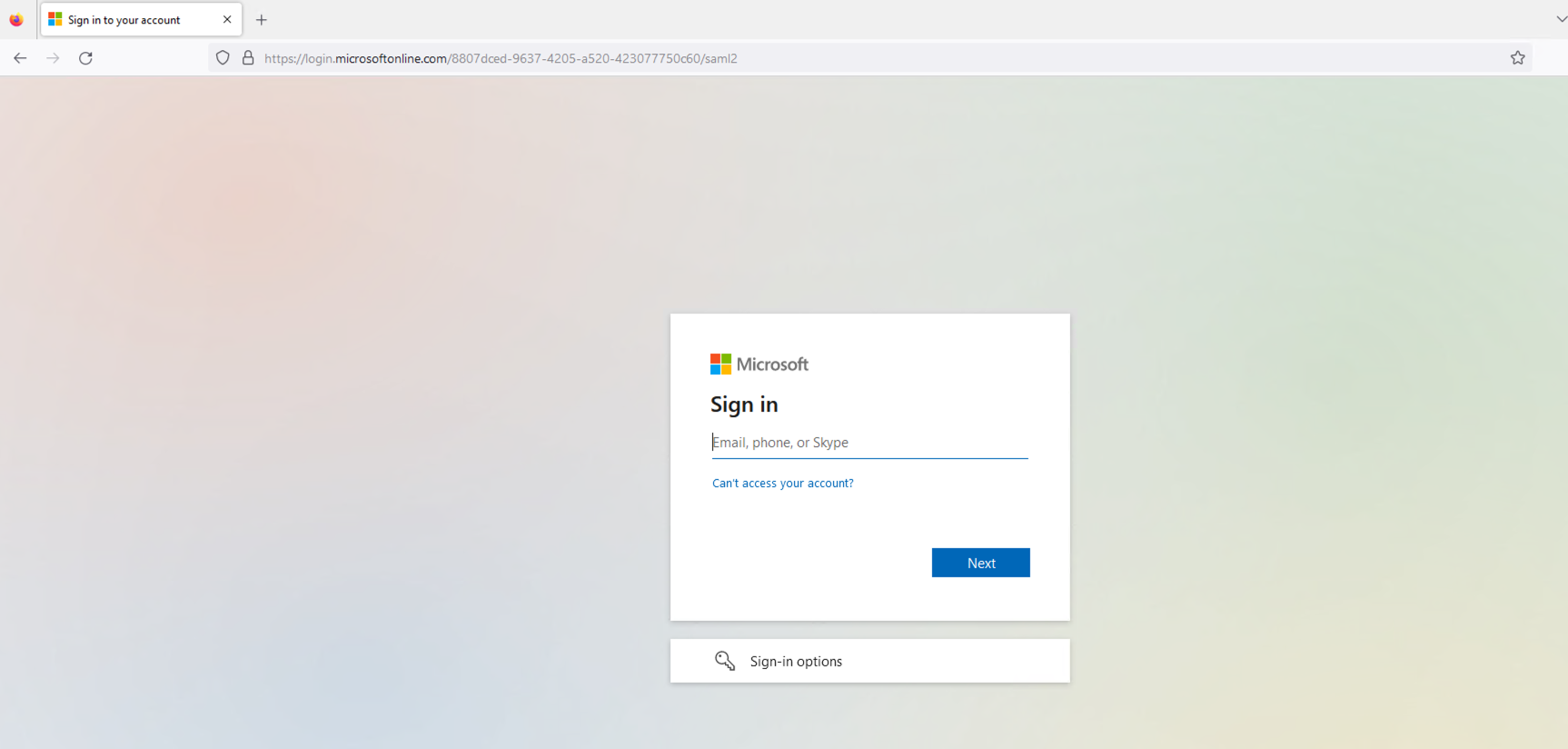
그림 8: IdP 로그인 페이지
IdP 로그인 페이지에 구성된 사용자의 자격 증명을 입력합니다. 제출하면 IdP가 사용자를 인증합니다.
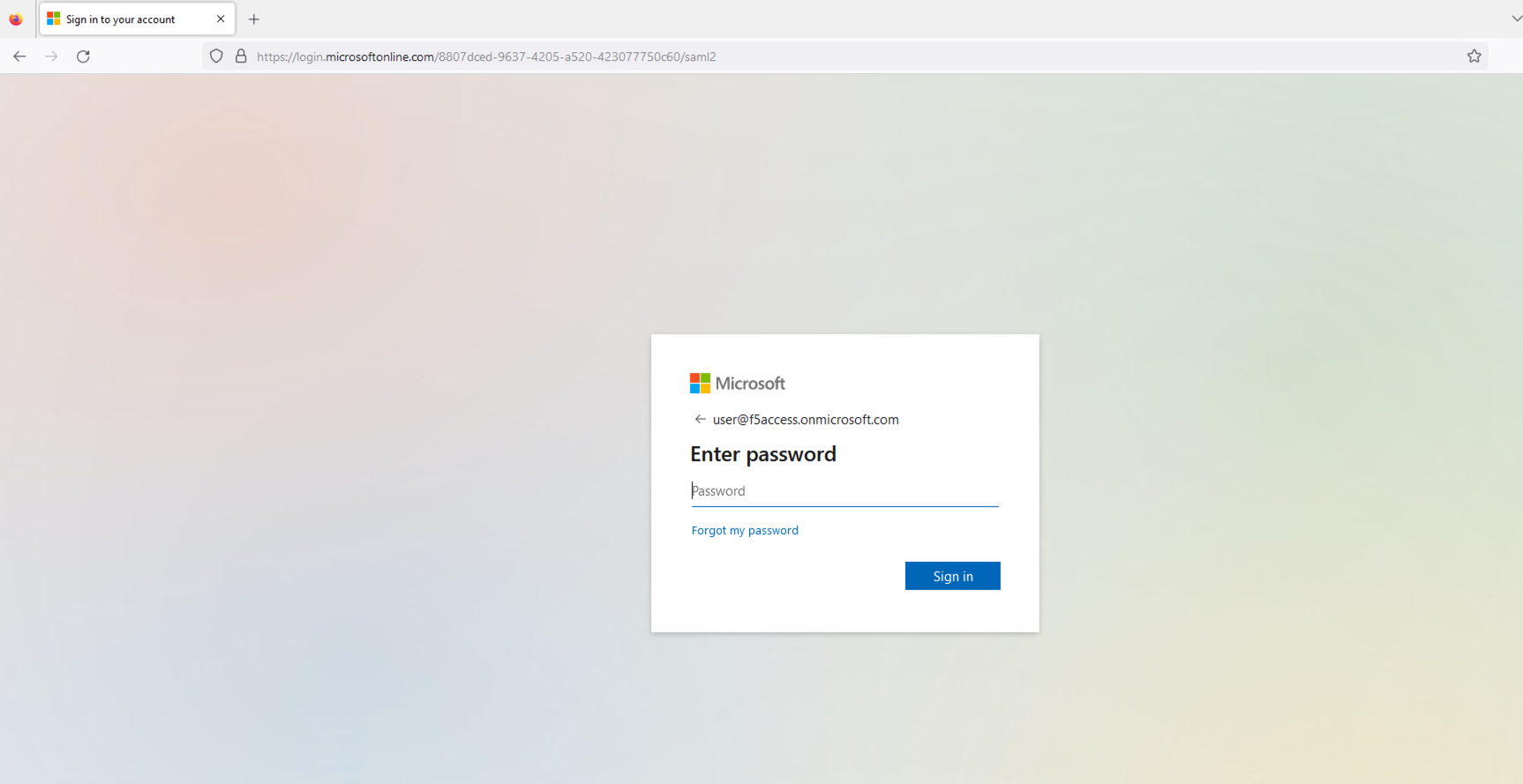
그림 9: 구성된 사용자의 자격 증명 입력
세션이 성공적으로 설정되면 사용자는 이전에 요청한 보호된 리소스에 액세스할 수 있습니다. 이후 해당 리소스가 사용자의 브라우저에 표시됩니다.
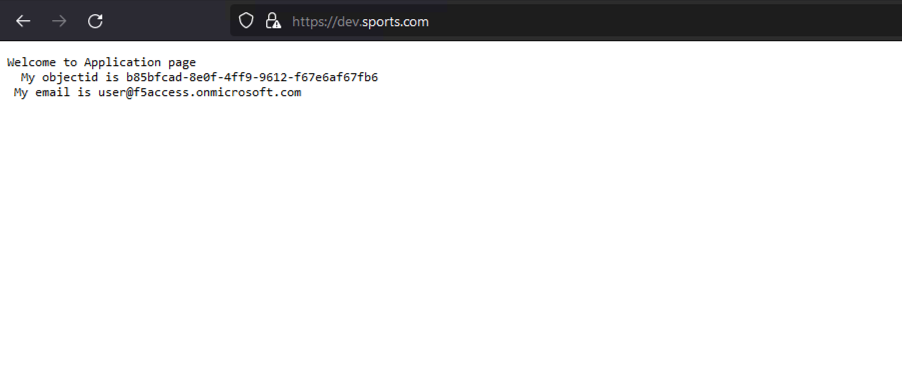
그림 10: 성공적으로 로드된 애플리케이션 페이지
SP 및 IdP 로그를 확인하면 SAML 흐름에 관한 유용한 정보를 얻을 수 있습니다. SP 측(NGINX Plus)에서는 auth_token 쿠키가 올바르게 설정되었는지 확인합니다. IdP 측(Microsoft Entra ID)에서는 인증 프로세스가 오류 없이 완료되고 SAML 어설션이 SP로 전송되는지 확인합니다.
NGINX access.log는 다음과 같아야 합니다:
127.0.0.1 - - [14/Aug/2023:21:25:49 +0000] "GET / HTTP/1.0" 200 127 "https://login.microsoftonline.com/" "Mozilla/5.0 (Macintosh; Intel Mac OS X 10_15_7) AppleWebKit/605.1.15 (KHTML, like Gecko) Version/16.1 Safari/605.1.15" "-"

99.187.244.63 - Akash Ananthanarayanan [14/Aug/2023:21:25:49 +0000] "GET / HTTP/1.1" "dev.sports.com" 200 127 "https://login.microsoftonline.com/" "Mozilla/5.0 (Macintosh; Intel Mac OS X 10_15_7) AppleWebKit/605.1.15 (KHTML, like Gecko) Version/16.1 Safari/605.1.15" "-
반면 NGINX debug.log는 다음과 같습니다:
2023/08/14 21:25:49 [info] 27513#27513: *399 js: SAML SP success, creating session _d4db9b93c415ee7b4e057a4bb195df6cd0be7e4d
SP에서 시작된 로그아웃 기능 테스트
SAML Single Logout(SLO)을 사용하면 한 번의 작업으로 관련된 모든 IdP와 SP에서 로그아웃할 수 있습니다. NGINX Plus는 SP 시작 및 IdP 시작 로그아웃 시나리오를 지원하여 SSO 환경의 보안과 사용자 경험을 향상합니다. 이 예에서는 SP 시작 로그아웃 시나리오를 사용합니다.
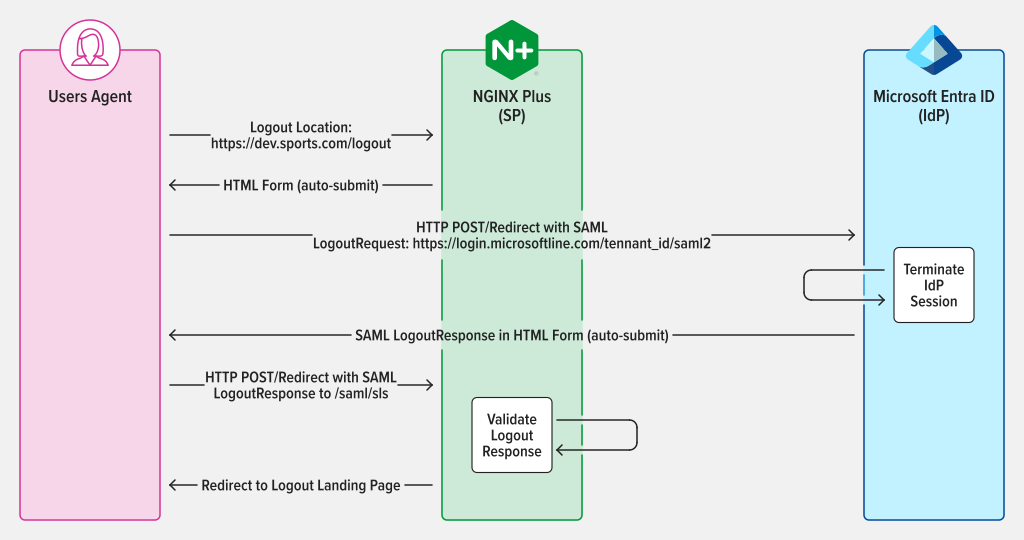
그림 11: LogoutRequest 및 LogoutResponse에 POST/리디렉션 바인딩을 사용하는 SAML SP 시작 SLO
세션 인증을 완료한 후 SP에 구성된 로그아웃 URL에 접속하여 로그아웃합니다. 예를 들어 https://dev.sports.com/logout를 NGINX Plus의 로그아웃 URL로 설정했다면 브라우저의 주소 표시줄에 해당 URL을 입력합니다.
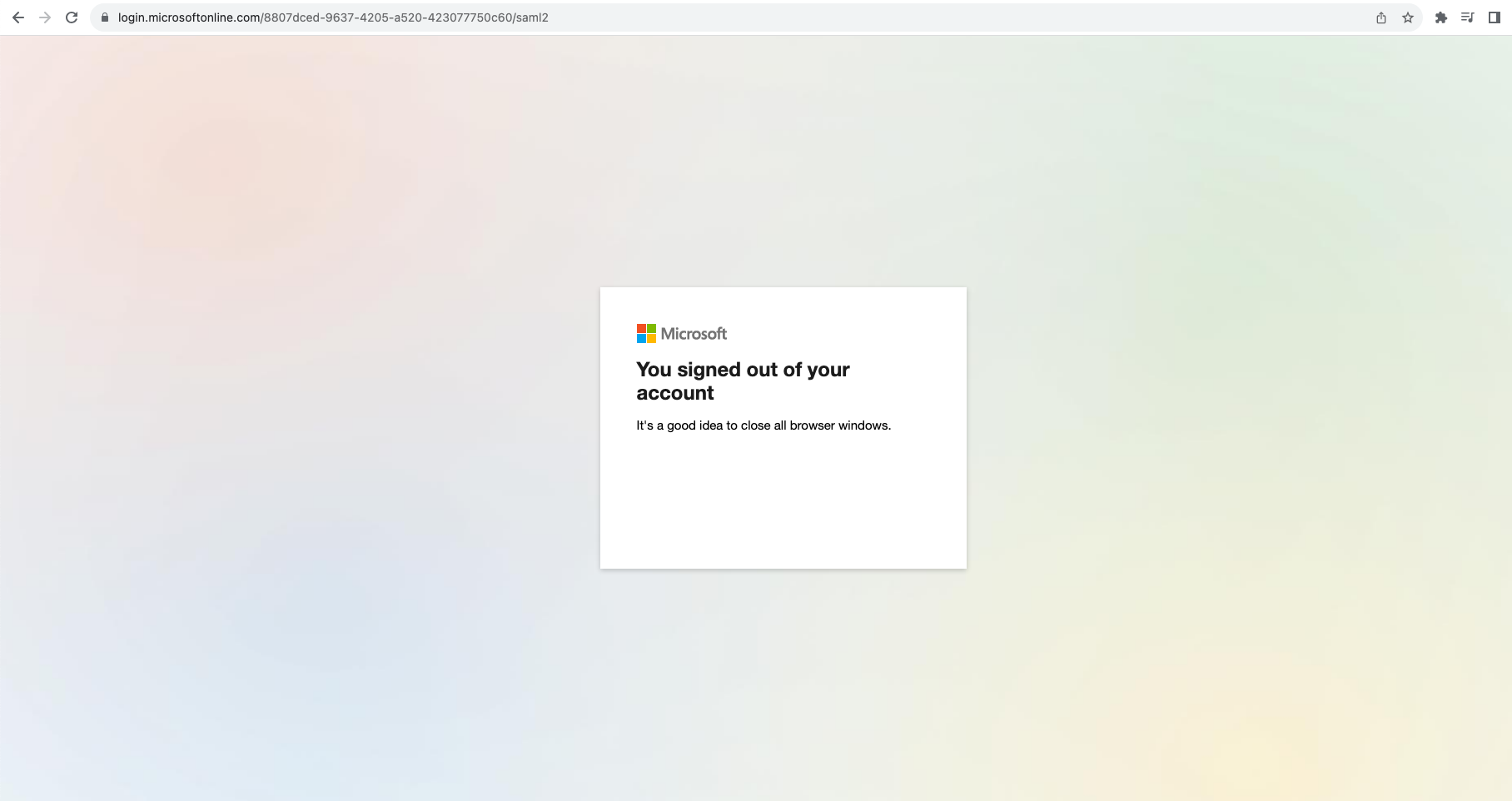
그림 12: 세션에서 성공적으로 로그아웃
안전하게 로그아웃하려면 SP가 SAML 요청을 시작해야 하며, 이 요청은 IdP에서 검증 및 처리됩니다. 이 작업을 통해 사용자의 세션이 정상적으로 종료되며, 이후 IdP는 SAML 응답을 전송하여 사용자의 브라우저를 SP로 다시 리디렉션합니다.
결론
축하합니다! 이제 NGINX Plus를 SAML SP로 활용하여 인증 프로세스의 보안과 편의성을 한층 더 높일 수 있습니다. 이 새로운 기능은 NGINX Plus의 중요한 발전으로, 보안과 효율성을 중시하는 조직에 더욱 강력하고 다재다능한 솔루션을 제공합니다.
NGINX Plus에서 SAML을 사용하는 방법 자세히 알아보기
지금 바로 NGINX Plus 30일 무료 체험을 시작하여 NGINX Plus에서 SAML을 사용할 수 있습니다. 유용하게 활용하시기를 바라며, 여러분의 피드백을 환영합니다.
SAML을 사용하는 NGINX Plus에 대한 자세한 내용은 아래 자료에서 확인할 수 있습니다.
작성자 소개

관련 블로그 게시물

시청하기: KubeCon North America 2023에서의 NGINX Gateway Fabric
이 영상에서는 KubeCon의 NGINX 부스를 찾아가, 저희가 공개한 Kubernetes Gateway API 구현을 살펴봅니다.
F5 NGINX로 대규모 WAF 플릿을 확인하고 관리하는 2가지 방법
앱 보안을 강화하는 두 가지 방법을 소개합니다. NGINX Management Suite를 통해 WAF 운영에 대한 가시성을 높이고, NGINX App Protect WAF를 활용해 코드형 보안을 구현하는 것입니다.
Ingress 컨트롤러 선택 가이드, 4부: NGINX Ingress Controller 옵션
개발 주체, 개발 철학, 프로덕션 환경 준비도, 보안 및 지원을 기준으로 어떤 NGINX Ingress 컨트롤러가 가장 적합한지 알아보세요.
진화하는 공격 환경에 NGINX App Protect Denial of Service가 적응하는 방법
NGINX App Protect Denial of Service(DoS)가 계층 7 DoS 공격을 방어하기 위해 완화 방법을 실시간으로 조정하는 방식을 설명합니다. 정상적인 사용자 행동과 서버 상태에 대한 모델을 생성하여 공격을 나타내는 이상 징후를 감지하고 맞춤형 완화 시그니처를 적용할 수 있습니다.
NGINX Instance Manager를 활용한 대규모 구성 업데이트 및 인증서 관리
NGINX Instance Manager 버전 1.0에는 두 가지 새로운 기능이 도입되었습니다. NGINX 인스턴스에 태그와 사용자 역할을 지정하면 전체 그룹에 구성을 한 번에 적용할 수 있습니다. 인증서 검사는 만료 예정인 인증서를 감지하여 서비스 중단을 방지할 수 있도록 인증서를 교체할 수 있게 해줍니다.
Netflix가 자사 CDN의 핵심으로 NGINX를 선택한 이유
Netflix가 글로벌 콘텐츠 전송 네트워크인 Open Connect의 스트리밍 미디어 기술로 NGINX를 선택한 이유를 NGINX 개발자 Gleb Smirnoff에게서 알아보세요.