NGINX는 오랫동안 고성능 웹 서버와 로드 밸런서를 구동하기 위한 최고의 선택지 중 하나로 인정받아 왔습니다. 그러나 마이크로서비스 아키텍처가 부상하고 효율적인 API 관리의 필요성이 커지면서, NGINX는 API 게이트웨이를 구축하는 데에도 널리 사용되고 있습니다.
이 블로그에서는 OpenAPI 스키마 정의를 선언적 API 접근 방식을 사용하여 웹 애플리케이션 방화벽 보안과 개발자 포털을 갖춘 API 게이트웨이로 실행되는 완전한 기능의 NGINX 구성으로 변환하는 방법을 살펴봅니다.
NGINX Plus를 활용하여 API 관리 프로세스를 간소화하고 애플리케이션의 성능을 최적화하는 방법을 단계별 지침과 유용한 정보로 안내해 드리겠습니다.
API 게이트웨이 소개
API 게이트웨이는 클라이언트와 백엔드 서비스 간의 통신을 관리하고 보호하는 중앙 허브 역할을 합니다. 클라이언트와 백엔드 서버 사이에 위치하는 리버스 프록시로서 수신 요청을 라우팅하고 적절한 서비스에 분배합니다. 이를 통해 클라이언트와 서비스가 더욱 효율적으로 통신할 수 있으며, API 게이트웨이가 인증, 권한 부여, 요청 속도 제한, 캐싱 등의 작업을 처리할 수 있습니다.
또한 API 게이트웨이는 보안 계층 역할을 하여 잠재적인 위협과 공격으로부터 백엔드 서비스를 보호할 수 있습니다. 암호화, 토큰 기반 인증, 액세스 제어 등의 보안 조치를 적용하여 권한이 있는 사용자만 서비스에 액세스하도록 할 수 있습니다. API 게이트웨이는 이러한 보안 기능을 한곳에서 통합 관리함으로써 시스템의 전반적인 보안 아키텍처를 간소화하고 여러 서비스에 걸쳐 보안 조치를 구현하는 데 따르는 복잡성을 줄여 줍니다.
NGINX 선언적 API 프로젝트
커뮤니티에서 지원하는 NGINX 선언형 API 프로젝트는 NGINX Instance Manager를 위한 선언형 REST API 세트를 제공합니다.
JSON 서비스 정의를 사용하여 NGINX Plus 구성의 수명 주기를 관리하고 NGINX Plus 구성을 생성할 수 있습니다. NGINX Instance Manager와 함께 사용하면 GitOps 통합이 지원됩니다. 참조된 객체의 업데이트 여부를 원본 소스에서 확인하고 NGINX 구성을 자동으로 동기화된 상태로 유지합니다.
OpenAPI 스키마를 사용하여 NGINX를 API 게이트웨이로 자동 구성할 수 있습니다. 개발자 포털 생성은 Redocly를 통해 지원됩니다.
사전 요구 사항
이 블로그의 내용을 실행하려면 다음이 필요합니다:
- 실행 중인 NGINX Instance Manager
- A subscription (or 30일 무료 평가판 또는 NGINX Plus 및 NGINX App Protect WAF 구독이 필요합니다. NGINX Agent를 설치하여 NGINX Instance Manager에 연결하고
declarativeAPITest인스턴스 그룹에 포함해야 합니다. - NGINX Declarative API 프로젝트를 실행하기 위해 Docker 및 Docker Compose가 설치된 Linux 호스트(베어 메탈 또는 VM)
- 선언적 API 요청을 제출하기 위한 Postman
- Postman을 실행할 클라이언트 호스트
실습 개요
모든 필수 구성 요소를 설치하고 실행하면 NGINX Instance Manager에 NGINX App Protect WAF가 적용된 NGINX Plus 인스턴스가 온라인 상태로 표시됩니다.
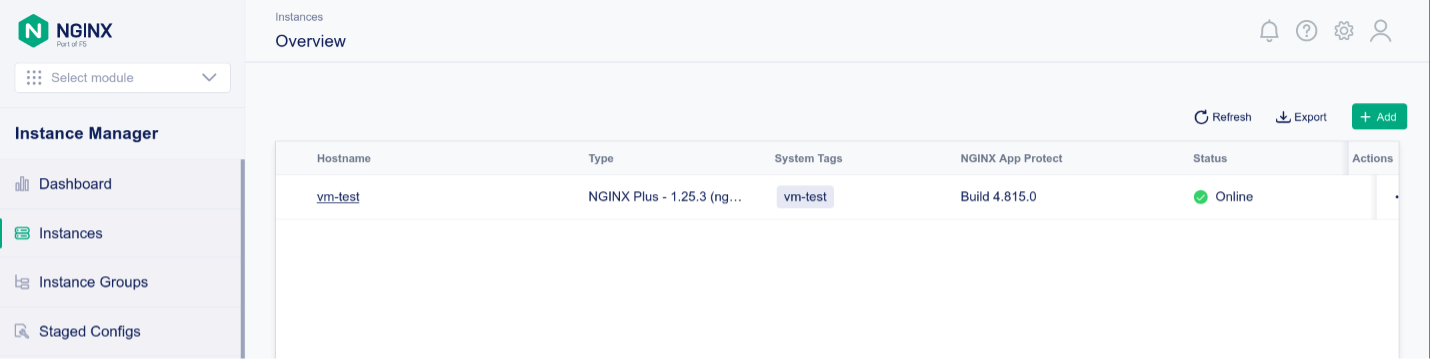
NGINX Plus 인스턴스는 declarativeAPITest 인스턴스 그룹에 속합니다
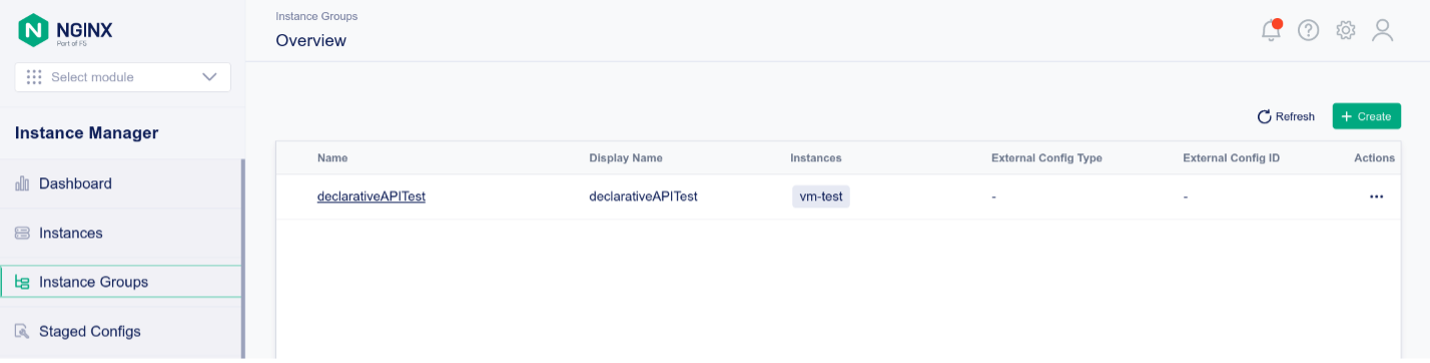
선언적 API 배포
NGINX 선언적 API 프로젝트는 NGINX Instance Manager에서 제공하는 REST API를 기반으로 하며, JSON 기반의 선언적 추상화 계층을 제공합니다. 다음 지침에 따라 선언적 API 프로젝트를 실행하세요:
1. docker ps를 실행하여 Docker가 실행 중인지 확인합니다:
f5@ubuntu:~$ docker ps
CONTAINER ID   IMAGE     COMMAND   CREATED   STATUS    PORTS     NAMES
2. Linux 호스트에서 GitHub 리포지토리를 복제합니다:
f5@ubuntu:~$ git clone https://github.com/f5devcentral/NGINX-Declarative-API/
Cloning into 'NGINX-Declarative-API'...
remote: Enumerating objects: 4072, done.
remote: Counting objects: 100% (1982/1982), done.
remote: Compressing objects: 100% (1332/1332), done.
remote: Total 4072 (delta 668), reused 876 (delta 609), pack-reused 2090
Receiving objects: 100% (4072/4072), 19.05 MiB | 4.88 MiB/s, done.
Resolving deltas: 100% (1154/1154), done.
f5@ubuntu:~$
3. docker-compose 디렉터리로 이동합니다:
f5@ubuntu:~$ cd NGINX-Declarative-API/contrib/docker-compose/
4. nginx-dapi.sh 스크립트를 사용하여 docker-compose를 통해 모든 컨테이너를 시작합니다. 최초 시작 시 모든 Docker 이미지가 자동으로 빌드됩니다:
f5@ubuntu:~/NGINX-Declarative-API/contrib/docker-compose$ ./nginx-dapi.sh -c start
-> Updating docker images
[+] Pulling 11/11
[...]
-> Deploying NGINX Declarative API
[+] Running 4/4
 ✔ Network nginx-dapi_dapi-network  Created 0.1s
 ✔ Container redis                  Started 1.5s
 ✔ Container devportal              Started 1.5s
 ✔ Container nginx-dapi             Started
5. 실행 중인 Docker 컨테이너를 확인합니다:
f5@ubuntu:~/NGINX-Declarative-API/contrib/docker-compose$ docker ps
CONTAINER ID   IMAGE                             COMMAND                  CREATED         STATUS         PORTS                                       NAMES
e29a2f783da2   nginx-declarative-api             "/deployment/env/bin…"   5 minutes ago   Up 5 minutes   0.0.0.0:5000->5000/tcp, :::5000->5000/tcp   nginx-dapi
97142840eaf7   redis                             "docker-entrypoint.s…"   5 minutes ago   Up 5 minutes   0.0.0.0:6379->6379/tcp, :::6379->6379/tcp   redis
6b50c0426643   nginx-declarative-api-devportal   "/deployment/src/sta…"   5 minutes ago   Up 5 minutes   0.0.0.0:5001->5000/tcp, :::5001->5000/tcp   devportal
6. 클라이언트 호스트에서 Postman을 실행하고 다음 위치의 NGINX Declarative API 컬렉션을 가져옵니다. https://raw.githubusercontent.com/f5devcentral/NGINX-Declarative-API/main/contrib/postman/NGINX%20Declarative%20API.postman_collection.json
7. Postman 컬렉션 변수를 편집하여 사용 중인 환경에 맞게 조정합니다:
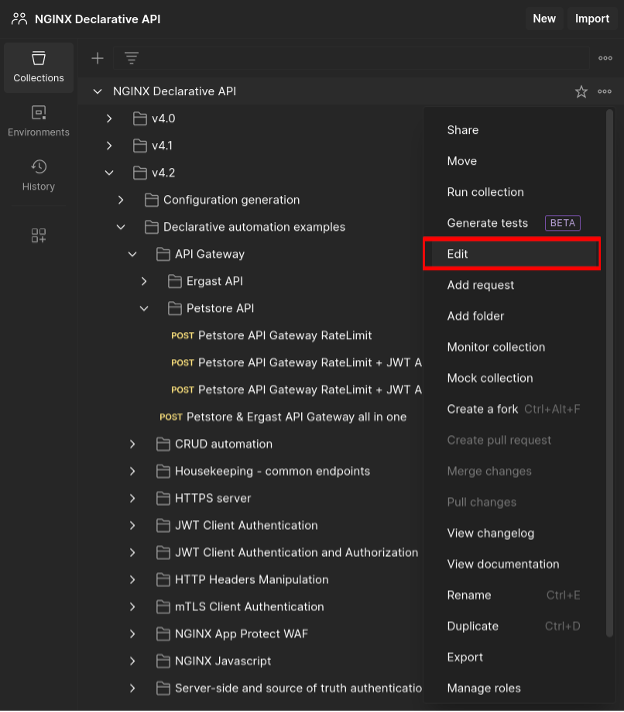
8. 다음 변수를 설정합니다:
ncg_host- Declarative API docker-compose가 실행 중인 Linux 호스트의 호스트 이름 또는 IP 주소ncg_port- NGINX 선언형 API용 TCP 포트: 기본값은 5000입니다nim_host- NGINX Instance Manager 기본 URL(예: https://nms.k8s.ie.ff.lan)nim_username- NGINX Instance Manager 인증 사용자 이름nim_password- NGINX Instance Manager 인증 비밀번호
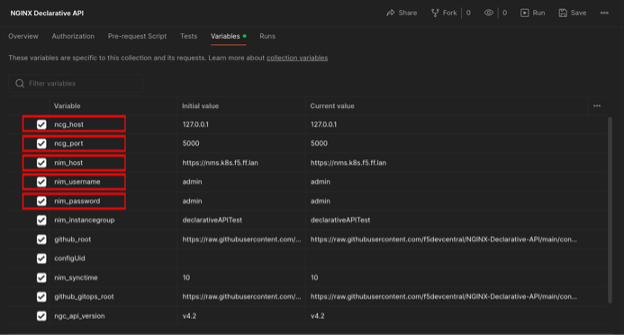
9. Postman에서 모든 변경 사항을 저장합니다
10. Postman 컬렉션에서 Petstore API Gateway RateLimit + JWT AuthN/AuthZ + WAF로 이동하여 요청을 엽니다.
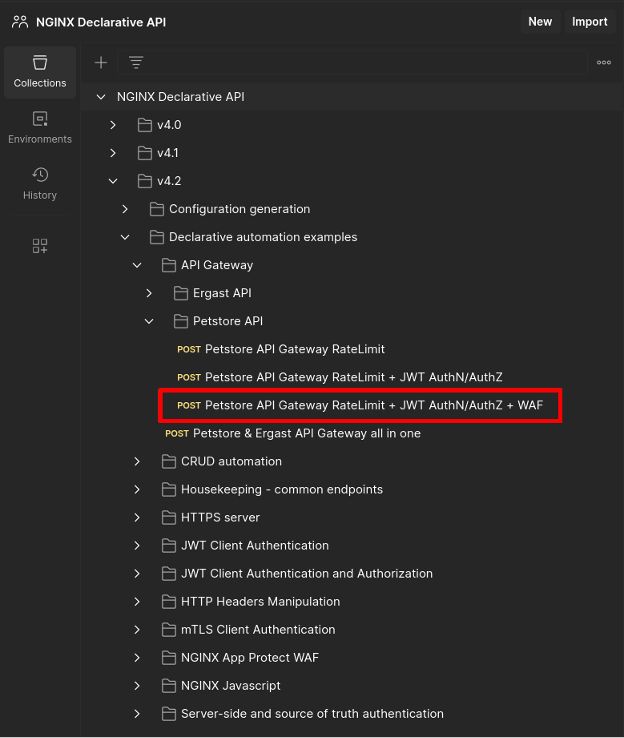
JSON 선언은 다음과 같습니다:
{
    "output": {
        "type": "nms",
        "nms": {
            "url": "{{nim_host}}",
            "username": "{{nim_username}}",
            "password": "{{nim_password}}",
            "instancegroup": "{{nim_instancegroup}}",
            "synctime": 0,
            "modules": [
                "ngx_http_app_protect_module"
            ],
            "certificates": [
                {
                    "type": "certificate",
                    "name": "test_cert",
                    "contents": {
                        "content": "{{github_gitops_root}}/v4.2/testcert.crt"
                    }
                },
                {
                    "type": "key",
                    "name": "test_key",
                    "contents": {
                        "content": "{{github_gitops_root}}/v4.2/testcert.key"
                    }
                }
            ],
            "policies": [
                {
                    "type": "app_protect",
                    "name": "production-policy",
                    "active_tag": "xss-blocked",
                    "versions": [
                        {
                            "tag": "xss-blocked",
                            "displayName": "Production Policy - XSS blocked",
                            "description": "This is a production-ready policy - XSS blocked",
                            "contents": {
                                "content": "{{github_gitops_root}}/v4.2/nap-policy-xss-blocked-bot-allowed.json"
                            }
                        },
                        {
                            "tag": "xss-allowed",
                            "displayName": "Production Policy - XSS allowed",
                            "description": "This is a production-ready policy - XSS allowed",
                            "contents": {
                                "content": "{{github_gitops_root}}/v4.2/nap-policy-xss-allowed.json"
                            }
                        }
                    ]
                }
            ]
        }
    },
    "declaration": {
        "http": {
            "servers": [
                {
                    "name": "Petstore API",
                    "names": [
                        "apigw.nginx.lab"
                    ],
                    "resolver": "8.8.8.8",
                    "listen": {
                        "address": "0.0.0.0:443",
                        "http2": true,
                        "tls": {
                            "certificate": "test_cert",
                            "key": "test_key",
                            "ciphers": "DEFAULT",
                            "protocols": [
                                "TLSv1.2",
                                "TLSv1.3"
                            ]
                        }
                    },
                    "log": {
                        "access": "/var/log/nginx/apigw.nginx.lab-access_log",
                        "error": "/var/log/nginx/apigw.nginx.lab-error_log"
                    },
                    "locations": [
                        {
                            "uri": "/petstore",
                            "urimatch": "prefix",
                            "apigateway": {
                                "openapi_schema": {
                                    "content": "http://petstore.swagger.io/v2/swagger.json"
                                },
                                "api_gateway": {
                                    "enabled": true,
                                    "strip_uri": true,
                                    "server_url": "https://petstore.swagger.io/v2"
                                },
                                "developer_portal": {
                                    "enabled": true,
                                    "uri": "/petstore-devportal.html"
                                },
                                "authentication": {
                                    "client": [
                                        {
                                            "profile": "Petstore JWT Authentication"
                                        }
                                    ],
                                    "enforceOnPaths": true,
                                    "paths": [
                                        "/user/login",
                                        "/user/logout"
                                    ]
                                },
                                "authorization": [
                                    {
                                        "profile": "JWT role based authorization",
                                        "enforceOnPaths": true,
                                        "paths": [
                                            "/user/login",
                                            "/user/logout"
                                        ]
                                    }
                                ],
                                "rate_limit": [
                                    {
                                        "profile": "petstore_ratelimit",
                                        "httpcode": 429,
                                        "burst": 0,
                                        "delay": 0,
                                        "enforceOnPaths": true,
                                        "paths": [
                                            "/user/login",
                                            "/user/logout"
                                        ]
                                    }
                                ]
                            },
                            "log": {
                                "access": "/var/log/nginx/petstore-access_log",
                                "error": "/var/log/nginx/petstore-error_log"
                            },
                            "app_protect": {
                                "enabled": true,
                                "policy": "production-policy",
                                "log": {
                                    "profile_name": "secops_dashboard",
                                    "enabled": true,
                                    "destination": "127.0.0.1:514"
                                }
                            }
                        }
                    ]
                }
            ],
            "rate_limit": [
                {
                    "name": "petstore_ratelimit",
                    "key": "$binary_remote_addr",
                    "size": "10m",
                    "rate": "2r/s"
                }
            ],
            "authentication": {
                "client": [
                    {
                        "name": "Petstore JWT Authentication",
                        "type": "jwt",
                        "jwt": {
                            "realm": "Petstore Authentication",
                            "key": "{\"keys\": [{\"k\":\"ZmFudGFzdGljand0\",\"kty\":\"oct\",\"kid\":\"0001\"}]}",
                            "cachetime": 5
                        }
                    }
                ]
            },
            "authorization": [
                {
                    "name": "JWT role based authorization",
                    "type": "jwt",
                    "jwt": {
                        "claims": [
                            {
                                "name": "roles",
                                "value": [
                                    "~(devops)"
                                ],
                                "errorcode": 403
                            }
                        ]
                    }
                }
            ]
        }
    }
}
The output 섹션에서는 다음을 정의합니다:
- 선언적 API가 NGINX 구성을 게시할 NGINX Instance Manager 서버
- TLS 인증서 및 키 - 저장된 신뢰할 수 있는 원본의 URL을 통해 참조할 수 있습니다
- NGINX App Protect WAF 보안 정책 - 이러한 정책은 저장된 신뢰할 수 있는 원본의 URL을 통해 참조할 수 있습니다
The declaration 섹션에서는 다음을 설명합니다:
- 생성할 NGINX 서버
- TLS 오프로딩 수행 여부
- 액세스 및 오류 항목을 기록할 위치
- API Gateway 구성이 배포되어 클라이언트가 액세스할 수 있게 되는 기본 URI인
/petstorebase URI where the API Gateway configuration will be deployed and be made accessible to clients - 게시할 API Gateway 구성 및 개발자 포털
- NGINX App Protect WAF를 활성화하는 방법, 사용할 보안 정책 및 보안 위반을 기록할 위치
- 클라이언트 요청을 인증하고 권한을 부여하는 방법
API Gateway 선언 섹션에서는 선언적 API가 결과를 제공하는 방식을 설명합니다.
OpenAPI 스키마는 전체 URL을 통해 참조됩니다:
"apigateway": {
    "openapi_schema": {
        "content": "http://petstore.swagger.io/v2/swagger.json"
    },
NGINX API Gateway 구성을 생성하도록 요청하고 업스트림 서버를 정의합니다. NGINX가 요청을 업스트림으로 리버스 프록시할 때 /petstore 기본 URI가 제거됩니다:
"api_gateway": {
        "enabled": true,
        "strip_uri": true,
        "server_url": "https://petstore.swagger.io/v2"
    },
특정 URI에 개발자 포털을 생성하고 배포해야 합니다:
"developer_portal": {
        "enabled": true,
        "uri": "/petstore-devportal.html"
    },
지정된 클라이언트 인증 프로필에 따른 클라이언트 인증이 /user/login 및 /user/logout에 적용됩니다:
"authentication": {
        "client": [
            {
                "profile": "Petstore JWT Authentication"
            }
        ],
        "enforceOnPaths": true,
        "paths": [
            "/user/login",
            "/user/logout"
        ]
    },
지정된 클라이언트 권한 부여 프로필에 따른 클라이언트 권한 부여가 /user/login 및 /user/logout에 적용됩니다:
"authorization": [
        {
            "profile": "JWT role based authorization",
            "enforceOnPaths": true,
            "paths": [
                "/user/login",
                "/user/logout"
            ]
        }
    ],
지정된 프로필에 따라 /user/login 및 /user/logout에 요청 속도 제한이 적용됩니다:
"rate_limit": [
        {
            "profile": "petstore_ratelimit",
            "httpcode": 429,
            "burst": 0,
            "delay": 0,
            "enforceOnPaths": true,
            "paths": [
                "/user/login",
                "/user/logout"
            ]
        }
    ]
},
12. Postman의 Send 버튼을 사용하여 선언적 API에 요청을 전송합니다. 응답은 다음과 유사합니다:
{
    "code": 200,
    "content": {
        "createTime": "2024-04-26T17:09:10.419574328Z",
        "details": {
            "failure": [],
            "pending": [],
            "success": [
                {
                    "name": "vm-test"
                }
            ]
        },
        "id": "1060ec49-120e-45ca-820b-5203c8b3538d",
        "message": "Instance Group config successfully published to declarativeAPITest",
        "status": "successful",
        "updateTime": "2024-04-26T17:09:10.881509913Z"
    },
    "configUid": "eecf1da6-9d8f-4e44-89cc-a470af79379d"
}
13. 이 단계에서는 NGINX 인스턴스가 API 게이트웨이로 구성되고, WAF 보안이 적용되며, 개발자 포털이 게시됩니다.
API 게이트웨이 테스트
참고: FQDN apigw.nginx.lab은 NGINX 인스턴스가 실행 중인 가상 머신의 IP 주소로 확인된다고 가정합니다.
1. jwt 디렉터리로 이동합니다:
f5@ubuntu:~$ cd ~/NGINX-Declarative-API/contrib/gitops-examples/jwt
2. 인증이 필요 없는 REST API 엔드포인트에 액세스합니다:
$ curl -w '\n' -ki https://apigw.nginx.lab/petstore/store/inventory
HTTP/2 200
date: Fri, 26 Apr 2024 17:13:54 GMT
content-type: application/json
access-control-allow-origin: *
access-control-allow-methods: GET, POST, DELETE, PUT
access-control-allow-headers: Content-Type, api_key, Authorization

{"totvs":5,"aut":1,"FORsold":1,[...]
3. 요청 속도 제한:
    $ curl -w '\n' -ki https://apigw.nginx.lab/petstore/user/login;curl -w '\n' -ki
    https://apigw.nginx.lab/petstore/user/login
    HTTP/2 401
    date: Fri, 26 Apr 2024 17:14:51 GMT
    content-type: text/html
    content-length: 179
    www-authenticate: Bearer realm="Petstore Authentication"
    <html>
    <head><title>401 Authorization Required</title></head>
    <body>
    <center><h1>401 Authorization Required</h1></center>
    <hr><center>nginx/1.25.3</center>
    </body>
    </html>
    HTTP/2 429
    date: Fri, 26 Apr 2024 17:14:51 GMT
    content-type: text/html
    content-length: 169
    <html>
    <head><title>429 Too Many Requests</title></head>
    <body>
    <center><h1>429 Too Many Requests</h1></center>
    <hr><center>nginx/1.25.3</center>
    </body>
    </html>
4. 인증 및 유효한 권한 부여:
$ curl -w '\n' -ki https://apigw.nginx.lab/petstore/user/login -H "Authorization: Bearer `cat jwt.devops`"
HTTP/2 200
date: Fri, 26 Apr 2024 17:15:41 GMT
content-type: application/json
access-control-allow-origin: *
access-control-allow-methods: GET, POST, DELETE, PUT
access-control-allow-headers: Content-Type, api_key, Authorization
x-expires-after: Fri Apr 26 18:15:41 UTC 2024
x-rate-limit: 5000

{"code":200,"type":"unknown","message":"logged in user session:1714151741883"}
5. 인증 및 유효하지 않은 권한 부여:
$ curl -w '\n' -ki https://apigw.nginx.lab/petstore/user/login -H "Authorization: Bearer `cat jwt.guest`"
HTTP/2 403
date: Fri, 26 Apr 2024 17:16:07 GMT
content-type: text/html
content-length: 153
<html>
<head><title>403 Forbidden</title></head>
<body>
<center><h1>403 Forbidden</h1></center>
<hr><center>nginx/1.25.3</center>
</body>
</html>
6. NGINX App Protect WAF 및 크로스 사이트 스크립팅 보안 위반:
$ curl -w '\n' -ki "https://apigw.nginx.lab/petstore/store/inventory?
"
HTTP/2 200
content-type: text/html; charset=utf-8
cache-control: no-cache
pragma: no-cache
content-length: 246
7. 다음 주소로 이동하여 개발자 포털에 액세스할 수 있습니다.
https://apigw.nginx.lab/petstore/petstore-devportal.html
시작하기
이 게시물에서 소개한 NGINX 솔루션을 사용해 보려면 지금 30일 무료 평가판을 시작하거나, 문의하여 사용 사례에 대해 상담해 보세요:
다운로드 NGINX Agent – 무료 오픈 소스입니다.
작성자 소개

관련 블로그 게시물

시청하기: KubeCon North America 2023에서의 NGINX Gateway Fabric
이 영상에서는 KubeCon의 NGINX 부스를 찾아가, 저희가 공개한 Kubernetes Gateway API 구현을 살펴봅니다.
F5 NGINX로 대규모 WAF 플릿을 확인하고 관리하는 2가지 방법
앱 보안을 강화하는 두 가지 방법을 소개합니다. NGINX Management Suite를 통해 WAF 운영에 대한 가시성을 높이고, NGINX App Protect WAF를 활용해 코드형 보안을 구현하는 것입니다.
Ingress 컨트롤러 선택 가이드, 4부: NGINX Ingress Controller 옵션
개발 주체, 개발 철학, 프로덕션 환경 준비도, 보안 및 지원을 기준으로 어떤 NGINX Ingress 컨트롤러가 가장 적합한지 알아보세요.
진화하는 공격 환경에 NGINX App Protect Denial of Service가 적응하는 방법
NGINX App Protect Denial of Service(DoS)가 계층 7 DoS 공격을 방어하기 위해 완화 방법을 실시간으로 조정하는 방식을 설명합니다. 정상적인 사용자 행동과 서버 상태에 대한 모델을 생성하여 공격을 나타내는 이상 징후를 감지하고 맞춤형 완화 시그니처를 적용할 수 있습니다.
NGINX Instance Manager를 활용한 대규모 구성 업데이트 및 인증서 관리
NGINX Instance Manager 버전 1.0에는 두 가지 새로운 기능이 도입되었습니다. NGINX 인스턴스에 태그와 사용자 역할을 지정하면 전체 그룹에 구성을 한 번에 적용할 수 있습니다. 인증서 검사는 만료 예정인 인증서를 감지하여 서비스 중단을 방지할 수 있도록 인증서를 교체할 수 있게 해줍니다.
Netflix가 자사 CDN의 핵심으로 NGINX를 선택한 이유
Netflix가 글로벌 콘텐츠 전송 네트워크인 Open Connect의 스트리밍 미디어 기술로 NGINX를 선택한 이유를 NGINX 개발자 Gleb Smirnoff에게서 알아보세요.